 PageKiwi
PageKiwi for WordPress beta
A free plugin that checks your WordPress site from the inside: broken links, pictures with no alt text, accessibility problems and settings that quietly hurt you. In plain English, with where to click to fix each one.
Free. For WordPress 6.3 or newer. It's only in your admin area (look for PageKiwi in the menu on the left), not on your public site. It runs only when you press Check my site, sends nothing to us, and adds nothing to the pages your visitors see. To test links, your server asks the pages they point to. What changed in each version.
What it checks
- Broken links
Dead links to your own pages and to other websites, links to pages that have moved, leftover test addresses like localhost, and phone and email links that don't work.
- Accessibility
Pictures with no description, links with no words or just "click here", a second main heading, headings that skip a level.
- Pictures and facts
Media Library pictures with no alt text (filled in right on the list), pictures that don't load, heavy photos, and pages that give different phone numbers or emails.
- Settings that quietly hurt you
Search engines turned away, no padlock, the default tagline, no site icon, updates waiting, a user called "admin".
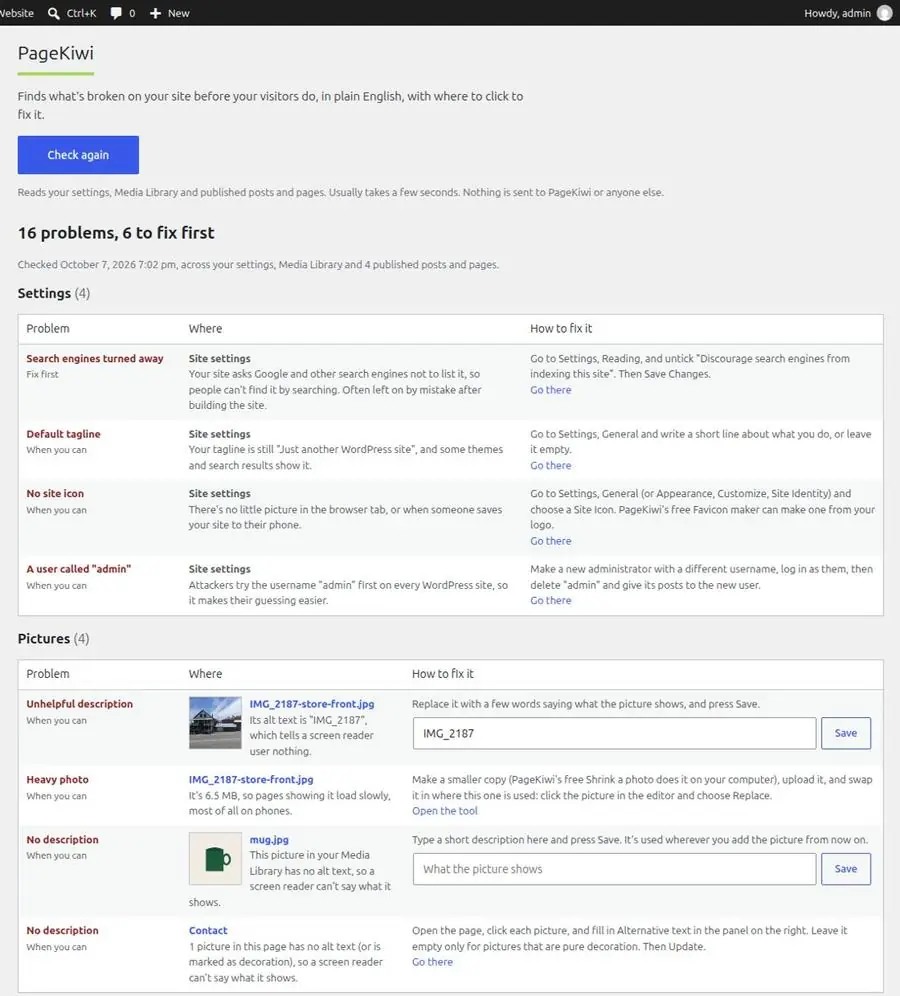
The plugin on a test site we filled with mistakes on purpose. How to install and use it, step by step.
Install it
- Download the plugin (the button above). Don't unzip it.
- In your WordPress admin, go to Plugins, Add Plugin, then Upload Plugin.
- Choose the pagekiwi.zip file and click Install Now, then Activate.
- Click PageKiwi in the menu on the left and press Check my site.
It's in beta. We've sent it to the WordPress plugin directory, and it's waiting for their review. Until it's listed there, install it from the zip as above.
What it can't do
It reads your content, not the finished page, so it can't judge color contrast or what your theme adds. For that, run Full Check on your home page, or use PageKiwi for Chrome. Automated checks find many common problems, not all of them: PageKiwi helps you get closer to accessibility rules like the ADA and WCAG, but it can't promise your site meets them. Website accessibility: where to start.