Tool
Email deliverability test
Updated Oct 8, 2026
Email check reads SPF, DKIM and DMARC, the three settings that decide whether your email reaches the inbox.
10 free checks a day
Try it on pagekiwi.com.
We only read your domain's public settings. We don't send any email. If you type an email address, only the part after the @ leaves your browser, and we keep that in our scan log for 90 days. For the full story, see Stop your emails going to spam.
What you'll get
Will the email you send reach the inbox, or land in spam? Usually it comes down to these three settings, which nobody told you about. We check them and say what to ask for.
Here's Wrenfield, our test town. It can't receive email at all, and it has no DMARC rule, so mail servers aren't told what to do with fake email in its name. Each cross comes with what to ask for.
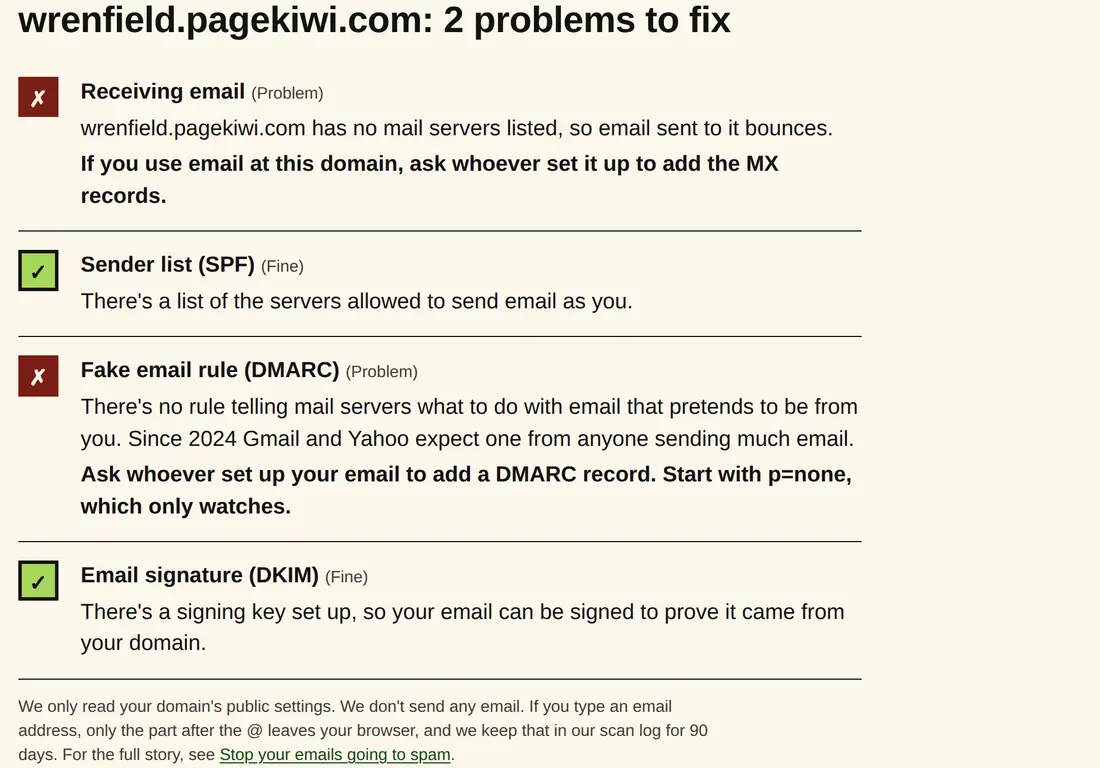
We look for DKIM under the 11 names email services use most, so if yours uses another name we can say "not found" when it's there. Whoever set up your email can tell you for sure.
How to use it
- Type your email address, or just your website, like YourWebsite.com.
- Press Check email. It takes a few seconds.
- Anything with a cross is a reason your emails might land in spam. Send the page to whoever set up your email.
What your results mean
- Receiving email
- Whether your domain is set up to receive email, and who handles it (Google, Microsoft and so on).
- Sender list (SPF)
- A list of who's allowed to send email as you. Without it, your emails look forged.
- Fake email rule (DMARC)
- Tells other email services what to do with fake emails using your name. Since 2024, Gmail and Yahoo require it from anyone sending them lots of email.
- Email signature (DKIM)
- A signature on each email proving it wasn't changed on the way. We look for it in the usual places, so a "not found" can be wrong.
When to use it
- People say your emails land in spam, or never arrive.
- After you move your email to a new provider, or your website to a new host.
- Before you send a newsletter or a big batch of emails.
- You're getting bounce messages for emails you didn't send.
Why it matters
- An email in spam is an email nobody reads: invoices, replies to customers, meeting notices.
- Without these settings, anyone can send email that looks like it came from you.
- The fixes are a few lines in your domain's settings, usually a short job for whoever set up your email.
Go deeper: Stop your emails going to spam. The three settings mail servers check, in plain English, and who to ask.